



Desktop App
Flowsta Vault
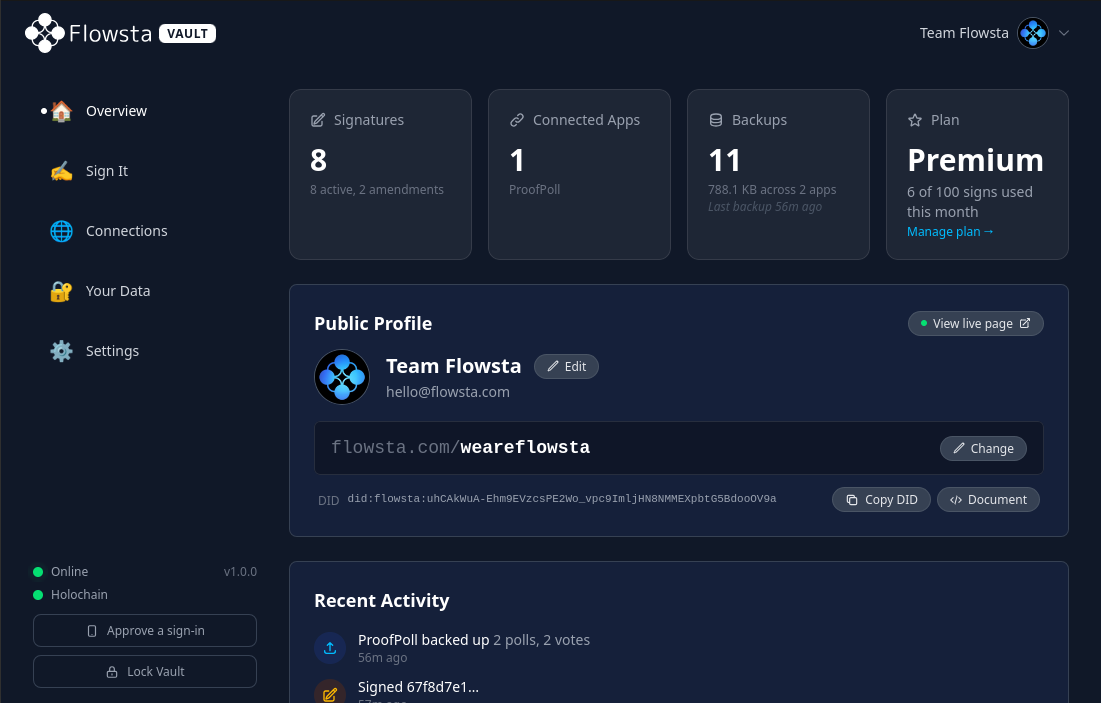
The home of your Flowsta identity. Your account is created here and lives here - your keys, your data, your approvals, all on your machine. Sign in everywhere with it, sign your work with Sign It, and run apps that respect you.
Free & open source · Linux, macOS and Windows · Mobile on the way · v1.1.3
What you can do
More than an identity manager
Your keys, your apps, your data - all on your own machine.
Sign your files with Sign It
Cryptographically sign any file - declare your rights, AI policy and authorship. Right-click from your OS file manager to sign without leaving where you are, and sign files up to 10 GB locally with no upload.
About Sign It →Run third-party apps - even offline
Vault runs a local Holochain conductor, so third-party apps live right beside your identity. Sign in to them with no internet at all - and you approve every connection.
Your data, encrypted and portable
Flowsta and the apps you connect store your data encrypted on your own machine - never a remote server. Export it all, keys included, whenever you want. No lock-in.
One identity, everywhere
Browser sessions, app sign-ins, even sign-ins on your phone - all approved from your Vault with keys only you hold. Moving machines? Your recovery phrase restores the same identity anywhere.
Get Started
Download Vault
Linux
Debian .deb
x86_64
macOS
Apple Silicon .dmg
Apple Silicon
Windows
Setup .exe
x86_64
Need a different build?
For other formats - Intel Mac (.dmg), Linux .rpm, Windows .msi - head to the v1.1.3 release on GitHub to see the full list of installers for this version.
Only ever download Flowsta Vault from the buttons above or directly from our GitHub releases page - never from anywhere else. Vault is where you enter your password and 24-word recovery phrase, and a tampered build could steal them and take control of your identity. No third-party mirror, app store, or download site is a safe source. If in doubt, always verify you're on github.com/WeAreFlowsta.
Comfortable with a terminal? Every release also ships a SHA256SUMS.txt so you can confirm your download matches what we published. If that doesn't mean anything to you, you don't need it - the download buttons above are all you need.
Setup
How It Works
Download Vault
Grab the installer for your platform from the download section above. Linux, macOS and Windows are all supported - free and open source.
Create your Flowsta identity
Open Vault and create your free account. It generates your identity on your device and walks you through saving your 24-word recovery phrase - the one key to your account, so write it down and keep it safe. Already have a flowsta.com account? Sign in during setup and the Vault upgrades it - your username, data, and signatures come with you.
Use it everywhere
Sign in across the web and Holochain apps, sign files with Sign It, and approve every connection yourself. Vault starts with your computer and auto-locks when you step away - your keys stay yours.
Features
What's Inside
The security and design choices under the hood - so your keys, and your data, stay yours.
Encryption that holds
Your vault is encrypted with AES-256-GCM and your password is hashed with Argon2id - the same memory-hard scheme serious password managers rely on.
Zero-knowledge by design
Your recovery phrase and private keys are never stored unencrypted and never sent to a server. The key that signs as you lives in memory only while the vault is unlocked.
You approve every request
Apps must ask before they authenticate, link, or sign on your behalf. Choose which sites you trust, and revoke any connection at any time.
Always ready, always guarded
Starts with your computer and lives in the system tray, locked, so it's there the moment a site needs it. A configurable inactivity timeout (5 minutes to never) locks the vault and clears your keys.
Open source & signed
Flowsta Vault is MIT-licensed and fully public - read every line. Windows and macOS installers are code-signed, so your OS shows Flowsta as the publisher.
Recovery is the phrase
Your identity is a 24-word phrase. Restore it on any device with no reset email and no recovery process - the same phrase always rebuilds the same keys, even when Flowsta's servers are unreachable.